macOS JIT Memory
Mirrored from Outflank.
Introduction
The macOS Hardened Runtime prevents execution of unsigned code. Unsigned executables will not run, regardless of compilation settings. Processes cannot load unsigned shared libraries into apps with the Hardened Runtime. Nearly every app found on a modern system enables the Hardened Runtime, and Apple silicon processors enable memory protection for all apps. So, how does malware execute within such constraints?
- Valid signatures – There are a few examples of criminals signing their malware, but Apple can revoke certificates, and has done so quickly, even over the weekend.
- Script-based malware – Malware written in languages like Python and JavaScript for Automation (JXA) does not require a signature, though initial access delivery may be constrained.
- Hardened Runtime exceptions – Many legitimate applications permit unsigned memory or libraries using entitlements to disable Hardened Runtime features. Such exceptions may permit dylib sideloading or shellcode execution.
Before discussing these exceptions, I will catalog three malware implementation paradigms.
- Mach-O executable or library – A very common format for macOS malware, as seen in various open-source C2 implants. Mach-O files have the fewest in-memory restrictions in this context, but limit the ability of an operator to quickly obfuscate or wrap the payload in various execution containers.
- Reflectively loaded library – While more common on Windows, Mach-O reflective loaders are gaining popularity. Malware in this category typically consists of a shared library (.dylib) and a position-independent “loader” which maps the library into memory and executes a predefined export.
- Position-independent code (PIC) – Though I haven’t seen a PIC macOS implant, it is certainly possible. Instead of a shared library with a position-independent loader, the malware itself is PIC. In the context of this post, PIC implants have effectively the same constraints as a reflectively loaded library.
Applications can disable relevant Hardened Runtime capabilities using the following entitlements:
- Allow execution of JIT-compiled code
- Allow unsigned executable memory
- Allow DYLD environment variables
- Disable library validation
- Disable executable memory protection
Only one of these entitlements, disable-executable-page-protection, is typically sufficient on its own to execute shellcode. The combination of allow-dyld-environment-variables and disable-library-validation allows an operator to load an arbitrary dylib, but is insufficient for shellcode execution. The allow-unsigned-executable-memory and allow-jit entitlements permit shellcode execution, but we cannot execute shellcode without some method of injecting a loader, such as VBA macros.
Executing shellcode in a process with the allow-unsigned-executable-memory entitlement is straightforward and very similar to shellcode execution on Windows. Applications with the allow-jit entitlement, however, require a bit more nuance. In this post, I aim to demystify macOS JIT protections and demonstrate a reflective loader that works under multiple scenarios.
JIT Memory Behavior
The Hardened Runtime prevents writable+executable memory. We can allocate memory with read-write permissions, and then change it to read-execute later, though code execution in such memory still requires a valid signature. However, the allow-jit entitlement permits allocation of RWX memory by passing the MAP_JIT flag to mmap(). Without allow-jit, allow-unsigned-executable-memory, or disable-executable-page-protection, calls to mmap() with MAP_JIT will fail. Any of these entitlements (not just allow-jit) will allow the use of JIT memory. Code in memory allocated with MAP_JIT can be executed without a code signature.
To better understand the behavior of JIT memory, I published a GitHub repo with a few proof-of-concept programs at https://github.com/outflanknl/macos-jit.
According to Apple’s documentation, apps with the allow-jit entitlement “can only create one memory region with the MAP_JIT flag set”, though this was not true in my testing on macOS Tahoe 26.2. The “multiple-regions” PoC allocates two separate memory regions with the MAP_JIT flag, copies different data to each, ensures the addresses do not overlap, and validates that they each behave the same way.
region_a: 0x1004b8000
pad     : 0x1004bc000 (0x100000 bytes)
region_b: 0x1005bc000

WP WRITE(0)
  region_a off=0x100 write=OK exec=FAULT => WRITE(0)
  region_b off=0x200 write=OK exec=FAULT => WRITE(0)

WP EXEC(1)
  region_a off=0x100 write=FAULT exec=OK => EXEC(1)
  region_b off=0x200 write=FAULT exec=OK => EXEC(1)

region_a leaf: 0x1004b8000 - 0x1004bc000
region_b leaf: 0x1005bc000 - 0x1005c0000
Apple mentions another key detail in their documentation: “a thread cannot write to a memory region and execute instructions in that region at the same time”. Indeed, whether memory is writable or executable is thread-specific. The “different-threads” PoC uses two separate threads with opposite JIT states to demonstrate this behavior.
`MAP_JIT` region: 0x100228000

Phase 0: main=WRITE(0) child=EXEC(1)
  child    off=0x200 write=FAULT exec=OK => EXEC(1)
  main     off=0x100 write=OK exec=FAULT => WRITE(0)

Phase 1: main=EXEC(1) child=WRITE(0)
  child    off=0x200 write=OK exec=FAULT => WRITE(0)
  main     off=0x100 write=FAULT exec=OK => EXEC(1)
Each memory region with the MAP_JIT flag can have different permissions, even for the same thread. As shown in the “chained-alloc” PoC, we can allocate JIT memory, jump to it, and then repeat this process any number of times. This specific behavior confirms what I stated earlier: reflectively loaded libraries and fully PIC malware are effectively the same in this context.
Root page: 0x1040c8000
Payload size: 324 bytes
Per-hop trace (4 recorded):
  hop 1: src=0x1040c8000 dst=0x1040cc000 mprotect_rc=0
  hop 2: src=0x1040cc000 dst=0x1040d0000 mprotect_rc=0
  hop 3: src=0x1040d0000 dst=0x1040d4000 mprotect_rc=0
  hop 4: src=0x1040d4000 dst=0x1040d8000 mprotect_rc=0
Requested hops: 4
Assembly-reported depth: 4
Chain result: PASS
Shellcode Execution in JIT Memory
The allow-jit entitlement may be more secure than allow-unsigned-executable-memory for some scenarios, but I will establish their equivalence for a typical shellcode loader with an example that works in either scenario.
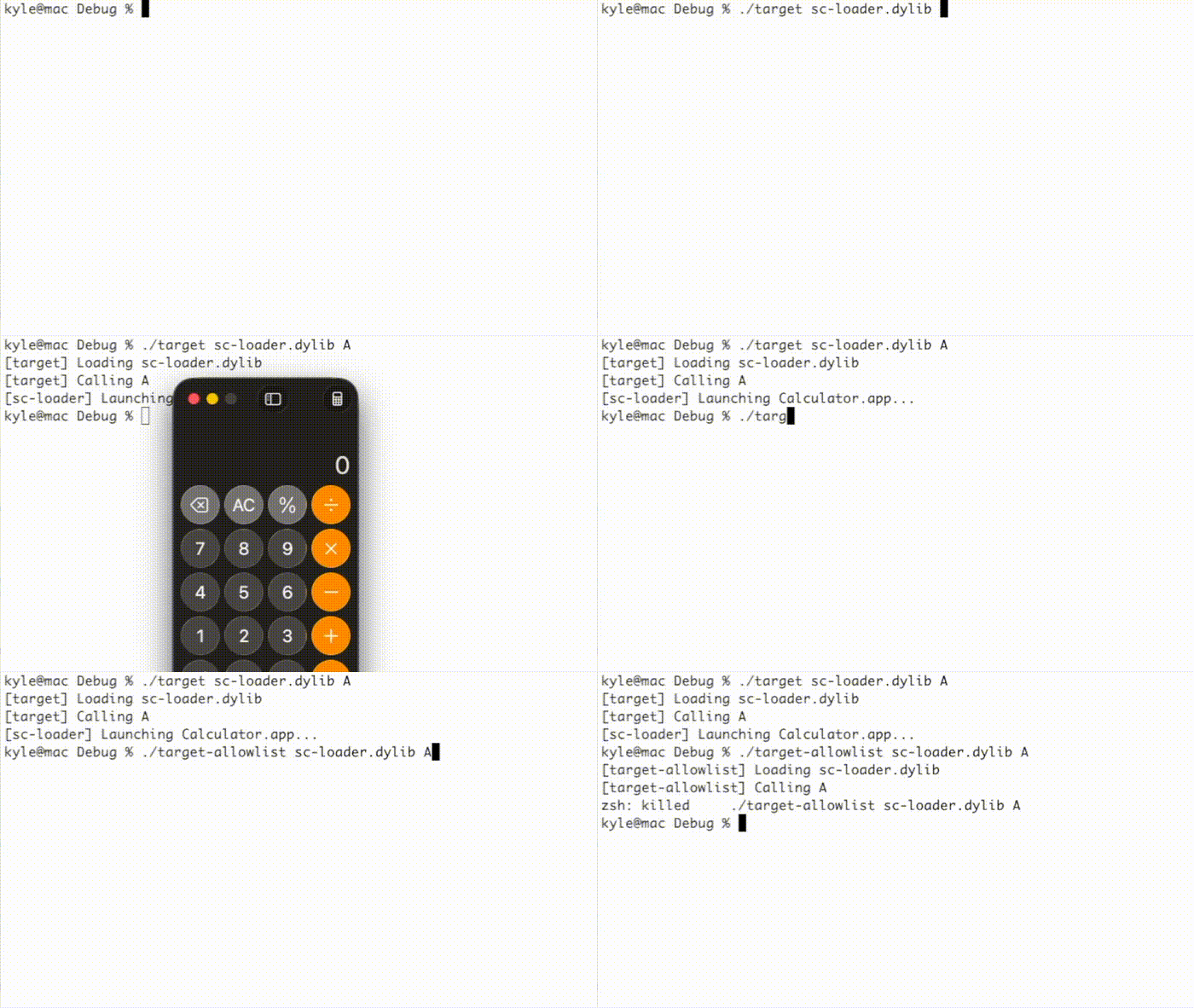
There are at least two working implementations, one more robust than the other. Both require changes to the shellcode loader and reflective loader. The first method requires the following steps:
- Allocate RWX memory with the
MAP_JITflag usingmmap(). - Execute
pthread_jit_write_protect_np(0). - Copy shellcode to the allocated memory.
- Execute
pthread_jit_write_protect_np(1). - Jump to the shellcode or create a new thread with
pthread_create().
This method is affected by another entitlement, jit-write-allowlist, that can further harden JIT memory by preventing use of the pthread_jit_write_protect_np() function. I could not find any applications with this entitlement, though. As shown below, the “target” example program executes a simple shellcode while the “target-allowlist” example prevents execution using the jit-write-allowlist entitlement.
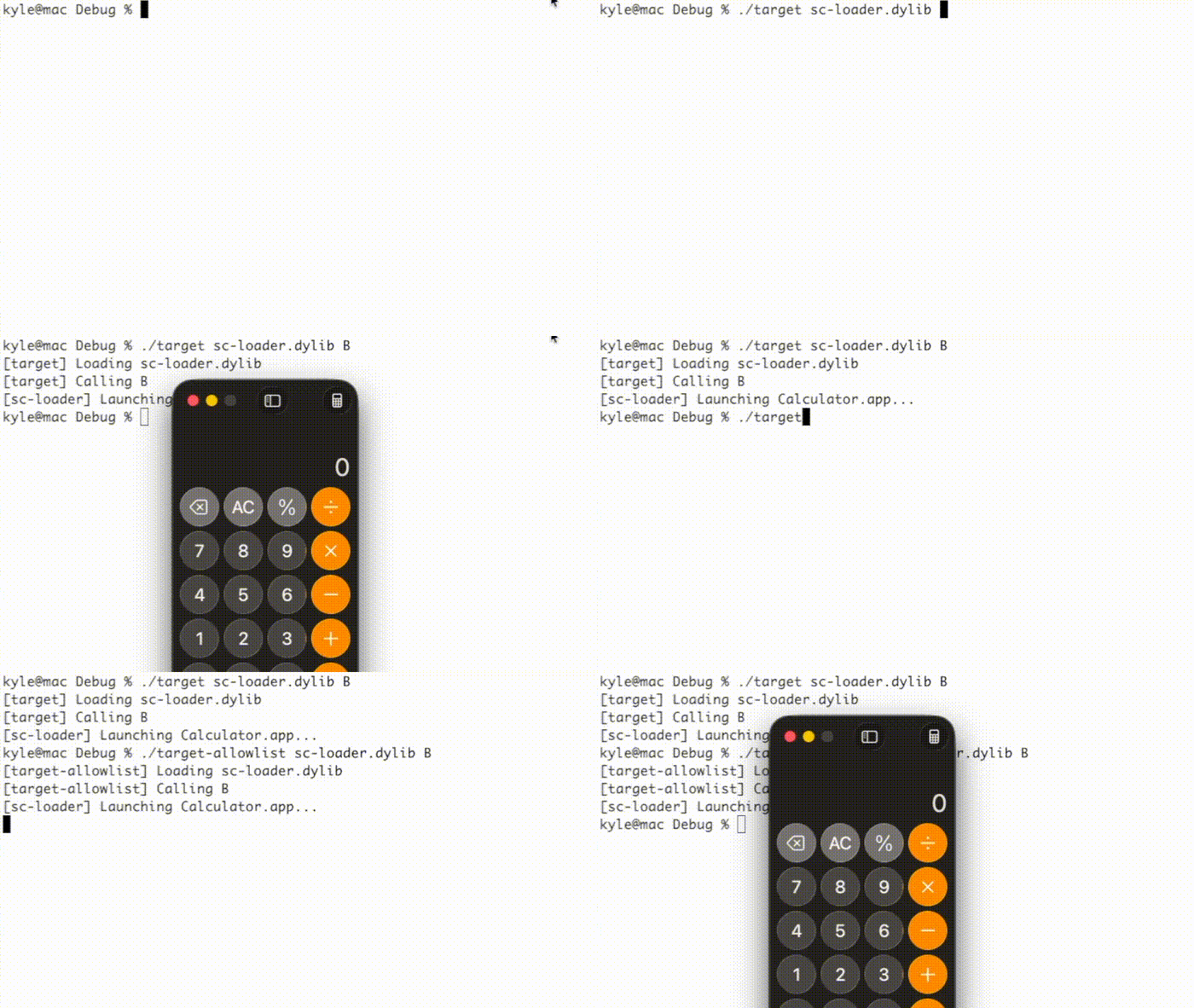
Alternatively, the following implementation works in spite of the jit-write-allowlist entitlement.
- Allocate RW memory with the
MAP_JITflag usingmmap(). - Copy shellcode to the allocated memory.
- Update the memory to RX with
mprotect(). - Jump to the shellcode or create a new thread with
pthread_create().
This technique executes a simple shellcode in both example programs:
Since macOS permits multiple JIT memory regions, one can implement either technique in both the shellcode loader and the reflective loader.
Use Cases
Several common applications have the allow-jit entitlement and will execute shellcode using dylib sideloading, VBA macros, or some other method:
- Firefox
- GoTo
- Obsidian
- OpenAI Codex
- Microsoft Excel, PowerPoint, and Word
- PyCharm
- Spotify
- VLC
- VSCode (and forks like Antigravity, Cursor, etc.)
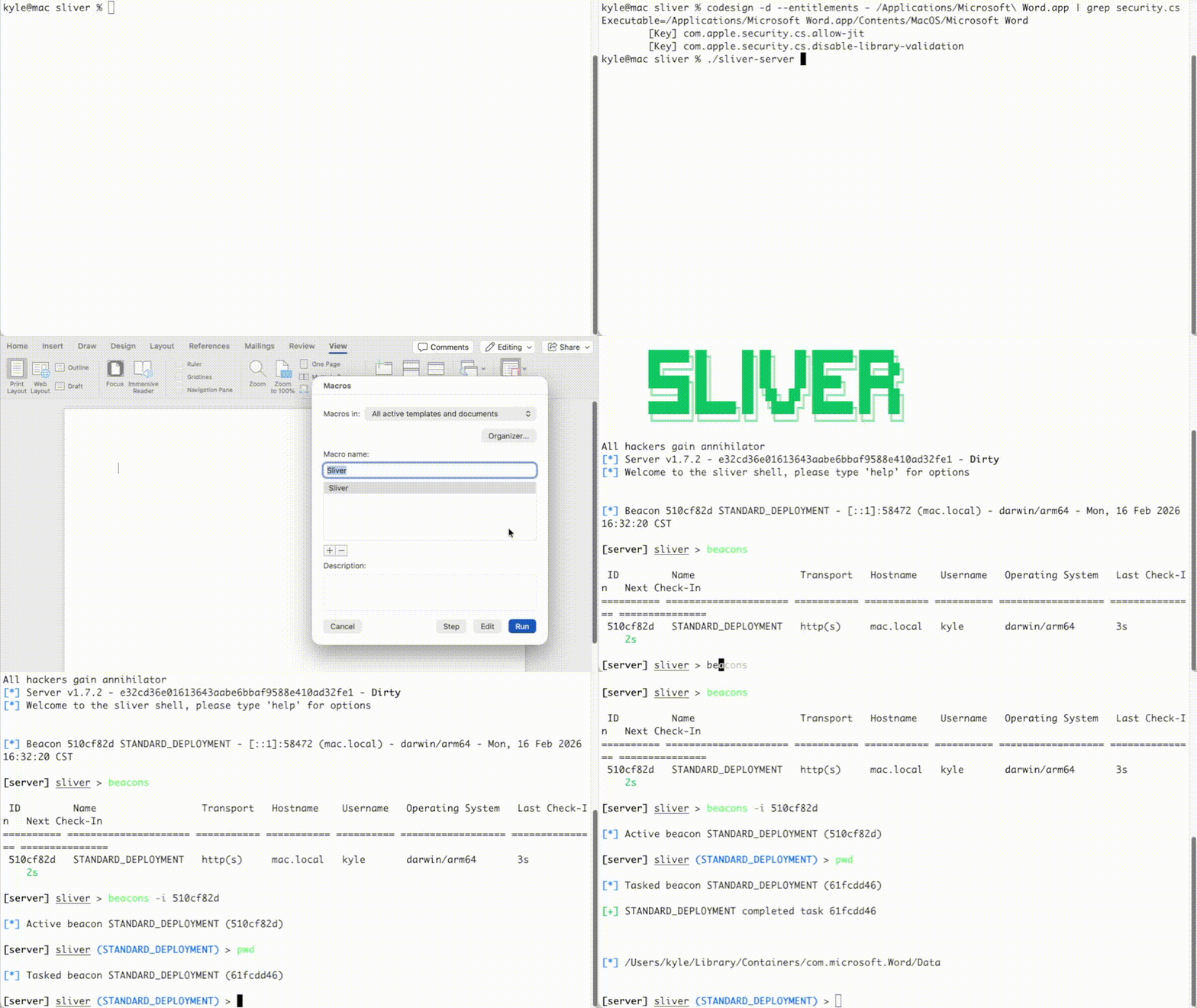
I updated Outflank’s public Mach-O reflective loader to support apps with either allow-jit or allow-unsigned-executable-memory. I also submitted a pull request to the Sliver macOS reflective loader. This PR makes it possible to execute Sliver shellcode in Microsoft Word using a VBA macro: